
YouTube to MP3 Converter
Convert a YouTube video to an MP3 audio file online or with the VTubeGo desktop app. Submit a video URL, review the audio options available for that source, and choose the MP3 format that fits your listening needs.
Paste a link to identify the video and available audio choices. Only convert content you are authorized to use.
- URL and keyword analysis
- 128–320kbps choices
- Batch tools in the desktop app
Want 320kbps, playlists, or batch conversion?The desktop app unlocks the full MP3 workflow and is where VTubeGo membership features are available.
What is YouTube to MP3 conversion?
YouTube to MP3 conversion extracts the audio track from a video and saves it in the widely supported MP3 format. The result is an audio-only file that can be useful for authorized music, podcasts, lectures, interviews, or spoken-word content.
Conversion changes the container and audio encoding; it does not create detail that is absent from the source. A higher bitrate can reduce additional compression loss, but it cannot turn low-quality source audio into true high-resolution audio.
When MP3 is the right choice
- You need audio without the video track.
- You want broad compatibility with phones, computers, cars, and media players.
- You prefer a smaller file than a typical video download.
- You have permission to save and use the source audio.
How to convert a YouTube video to MP3
- Open the VTubeGo online YouTube converter.
- Paste the URL of a video you are authorized to convert, or the music keyword you want to search for it.
- Review the MP3 audio and bitrate options returned for that source.
- Select an option and follow the on-screen steps to save the MP3 file.
Available options depend on the source video and current service support. A private, deleted, region-limited, age-restricted, live, or otherwise unavailable video may not return the same options as a public video.
How to choose an MP3 bitrate
Bitrate describes how much data is used for each second of compressed audio. Higher settings usually create larger files. The best option depends on the source quality, available storage, and how you plan to listen.
| MP3 bitrate | Typical use | What to consider |
|---|---|---|
| 128kbps | Speech, lectures, and smaller files | Lower file size, with less audio detail than higher settings |
| 192kbps | General listening | A practical balance between size and quality for many sources |
| 256kbps | Music and detailed audio | Larger files with less additional compression |
| 320kbps | Highest advertised MP3 option | Useful only when available; it cannot improve a lower-quality source |
Important: the converter can only offer the formats currently available for a source. Selecting 320kbps does not prove that the original audio contains 320kbps of unique detail.
Online YouTube to MP3 converter vs desktop app
| Option | Best for | Key consideration |
|---|---|---|
| Online converter | A quick conversion from one URL in a browser | No installation; options are shown after the URL is submitted |
| Desktop app | Advertised playlist, batch, subtitle, and long-video workflows | Requires installation on a supported Windows or Mac computer |
Choose the online tool for a single, straightforward task. Review the desktop product page when you need to process multiple authorized items or compare its additional features.
Move from one track to an entire audio workflow
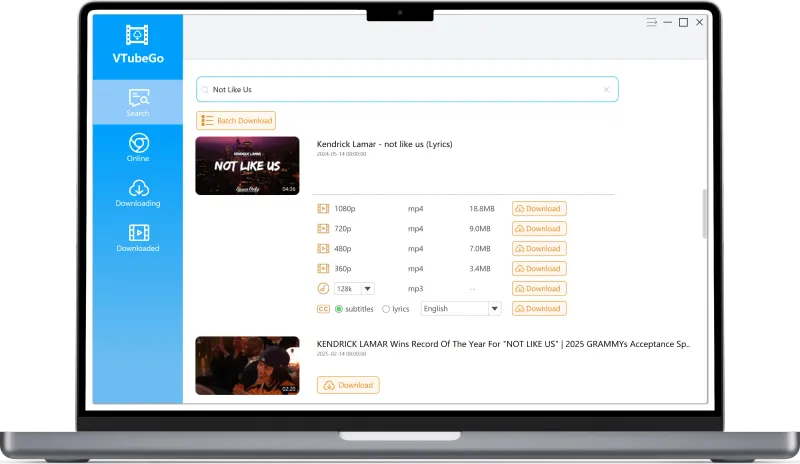
Use the online analyzer for a quick source check. Choose the VTubeGo desktop app when you need the membership features designed for repeated or larger MP3 tasks.
- Process advertised playlists and multiple authorized videos
- Compare available MP3 quality choices in one place
- Keep long-running conversions outside the browser
Why a YouTube to MP3 conversion may not work
The URL is not recognized
Copy the complete URL from the video page, remove accidental spaces, and confirm that the video opens normally in your browser.
No MP3 option appears
The source may be unavailable, restricted, live, unsupported, or missing an accessible audio track. Available options can change by source.
The audio sounds worse than expected
The output cannot exceed the quality of the source audio. Repeated conversion between lossy formats can also reduce quality.
The conversion takes longer than expected
Long videos, network conditions, source availability, and current service load can all affect processing time.
YouTube to MP3 frequently asked questions
How do I convert a YouTube video to MP3?
Open the VTubeGo online converter, paste the URL of a video you are authorized to convert, and choose an MP3 option returned for that source.
Can I convert YouTube to MP3 at 320kbps?
A 320kbps option may be available for some sources. The option shown by the converter does not improve audio that was originally encoded at a lower quality.
Does converting a video to MP3 improve its sound quality?
No. Conversion changes the file format but cannot restore audio detail that is missing from the source.
Can I convert a YouTube playlist to MP3?
The desktop app is the appropriate VTubeGo option for advertised playlist and batch processing features. Availability can vary by source and current product support.
Why is an MP3 option unavailable?
The URL may be invalid, unavailable, restricted, or unsupported. Check that the video opens normally and try the URL again.
Is it legal to convert a YouTube video to MP3?
Only convert content you own, content you have permission to use, or content whose license allows conversion. Follow applicable law and the source platform's terms.
Need video instead of audio?
Use the YouTube to MP4 converter guide to compare video resolutions and MP4 options, or return to the online YouTube converter.