
YouTube to MP4 Converter
Convert a YouTube video to MP4 online or with the VTubeGo desktop app. Submit a video URL, compare the resolutions available for that source, and choose an MP4 option for your screen, storage, and playback needs.
Paste a link to identify the video and available resolutions. Only convert content you are authorized to use.
- URL and keyword analysis
- 360p–8K source options
- Batch tools in the desktop app
Need 720p, 1080p, 4K, 8K, playlists, channels, or batch downloads? The desktop app unlocks the complete MP4 workflow and is where VTubeGo membership features are available.
What is YouTube to MP4 conversion?
YouTube to MP4 conversion saves authorized video content in an MP4 container. MP4 is widely supported by browsers, phones, computers, televisions, editing tools, and media players, making it a practical format for offline video playback.
An MP4 file can contain video, audio, subtitles, and metadata. The file extension alone does not define quality: resolution, frame rate, bitrate, and the codecs inside the container all affect playback and file size.
When MP4 is the right choice
- You need both video and audio in one file.
- You want broad playback compatibility.
- You need a selectable resolution for a phone, laptop, or larger screen.
- You have permission to save and use the source video.
How to convert a YouTube video to MP4
- Open the VTubeGo online YouTube converter.
- Paste the URL of a video you are authorized to convert or video keyword to search for it.
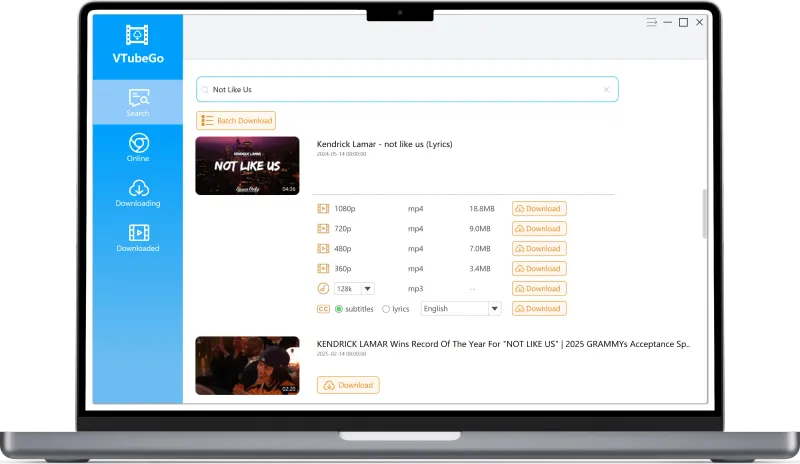
- Review the MP4 formats and resolutions returned for that source.
- Select an option and follow the on-screen steps to save the MP4 file.
Resolution and format availability depend on the source video and current service support. A converter cannot create genuine 4K detail from a source that is only available in 720p or 1080p.
How to choose an MP4 resolution
Choose a resolution that matches the source and the device where you plan to watch the video. Higher resolutions can look sharper on large screens, but they usually require more storage, bandwidth, and processing time.
| Resolution | Typical use | What to consider |
|---|---|---|
| 360p or 480p | Small screens and limited storage | Smaller files, but visibly less detail on large displays |
| 720p HD | Phones, tablets, and general viewing | A practical balance of clarity and file size |
| 1080p Full HD | Laptops, monitors, and televisions | More detail and typically a larger file than 720p |
| 1440p | High-resolution monitors | Sometimes labeled 2K; availability depends on the source |
| 2160p 4K | Large 4K displays and detailed footage | Requires substantially more storage and compatible playback hardware |
| 4320p 8K | Specialized 8K displays and source material | Very large files; offered only when the source and current support allow it |
Important: select from the options returned for the specific URL rather than assuming every video is available at every resolution.
Online YouTube to MP4 converter vs desktop app
| Option | Best for | Key consideration |
|---|---|---|
| Online converter | A quick conversion from one URL in a browser | No installation; available formats appear after submitting the URL |
| Desktop app | Advertised playlist, batch, subtitle, and long-video workflows | Requires installation on a supported Windows or Mac computer |
Use the online tool for a single task. Review the desktop product page when you need to process multiple authorized videos or compare its additional download and organization features.
Go beyond a single browser download
Use the online analyzer for a quick source check. Choose the VTubeGo desktop app when you need the membership features built for higher-quality and repeated MP4 workflows.
- Access advertised HD, 4K, and 8K choices when available
- Process playlists and multiple authorized videos
- Handle long videos and additional output options
MP4 file size and playback compatibility
What determines MP4 file size?
Duration, resolution, frame rate, video bitrate, audio bitrate, and encoding efficiency all affect size. Two videos at the same resolution can have very different file sizes.
Does MP4 always work on every device?
MP4 is broadly supported, but compatibility also depends on the video and audio codecs stored inside the file. An older device may not decode every modern codec.
Why might video and audio be separate?
Some high-resolution sources deliver video and audio as separate streams. The available converter options determine whether they can be combined into one playable file.
How can I improve playback compatibility?
Try another MP4 option returned for the source, use an updated media player, or choose a lower resolution supported by the target device.
Why a YouTube to MP4 conversion may not work
The URL is not recognized
Copy the complete URL from the video page, remove accidental spaces, and verify that the video opens normally before trying again.
The resolution you want is missing
The source may not provide that resolution, or the current converter may not support the source's video and audio combination.
The downloaded video does not play
Try an updated media player or another available MP4 option. Codec support, not just the MP4 extension, determines compatibility.
The conversion takes longer than expected
Long duration, high resolution, network conditions, source availability, and current service load can increase processing time.
YouTube to MP4 frequently asked questions
How do I convert a YouTube video to MP4?
Open the VTubeGo online converter, paste the URL of a video you are authorized to convert, and choose an MP4 option returned for that source.
What MP4 resolution should I choose?
Choose a resolution that matches the source, your screen, available storage, and network. 720p is practical for smaller screens, while 1080p or higher can be useful on larger displays when available.
Can every YouTube video be converted to 4K or 8K MP4?
No. A high-resolution option can only be offered when the source and current converter support make it available.
Why does an MP4 file have no sound or fail to play?
MP4 is a container, and device support also depends on the video and audio codecs inside it. Try another available option or an updated media player.
Why is the MP4 file larger than expected?
Duration, resolution, frame rate, bitrate, audio quality, and encoding all affect file size. Higher resolution alone does not determine the final size.
Is it legal to convert a YouTube video to MP4?
Only convert content you own, content you have permission to use, or content whose license allows conversion. Follow applicable law and the source platform's terms.
Only need the audio track?
Use the YouTube to MP3 converter guide to compare audio bitrates and MP3 options, or return to the online YouTube converter.